Showing posts with label Rigs. Show all posts

Tuesday, December 16, 2014

Holiday Rig Update!

Marv is getting into the holiday spirit with this new outfit.  If you've already purchased my Body Mech rig mega-pack, download the update now for free!    (That last link just takes you to your Gumroad library to get the update, so if you're looking to purchase the 12 Rig MegaPack and get all the free updates, click the image below:)


SANTA SETUP INSTRUCTIONS:
To get Marv all dressed up like the image above, follow these simple steps:
  • Open the Marv rig and head to Marv's main shader (either by opening the hypershade or by making the geometry selectable and then right-click > material properties).
  • Map the santa_color_1k.jpg texture to the Color channel.
  • Select the placement or global control and scroll down in the channel box until you find the slider for Santa Clothes.  Turn that on and you'll get the new geometry plus controls to shape the hat and beard.
  • Animate something fun!


Also, enjoy this very nice Ballerina test by Matthew Roe using the Tina rig:


Ballerina Animation from Matthew Roe on Vimeo.

Tuesday, October 21, 2014

BodyMech Rigs - October news

  • Texture Maps
  • Updates
  • Showcase!


TEXTURE MAPS

First, Halloween is just around the corner, so I've made a couple simple texture maps to get you in the candy-begging spirit.  They work great on all the Body Mechanics rigs.  Just put them into the "sourceimages" folder of your maya project and load them into the color channel of the body shader.

Download them HERE.


Incredi-costumes!


Ninjas!
Wonderwoman!

UPDATE 1.2

I've added auto-squash functionality to the spine of Marv and Stella.  Sooo much fun to play with.  It's on by default, but can be turned off on the UpperBody control.  I've also squashed the right shoulder rotation bug (where the rotate x is opposite of what it should be).  You can download the update at Gumroad.


SHOWCASE

And lastly, I wanted to showcase some of the awesome animation that everyone has been up to.  I'm sure I missed some great work out there, but here is a sample of what people are doing.  Keep it up!


Guerrilla animation team exercise - Landing and Settle from Sem Assink on Vimeo.


06 - Landing - Richard "the killer" Oud from Guerrilla Animators on Vimeo.


Aia Test Final from Kevin (Hoa) Nguyen on Vimeo.


Herc rig anim test from John Seldon on Vimeo.


Adam Bradford - Fall 2014 Game Animation Demo Reel from Adam Bradford on Vimeo.


Body Mech Rig Test from James King on Vimeo.

Saturday, August 30, 2014

New Rigs!

Update 10/4/ 2014:  The BodyMech Rigs are back up, and with new features!  Here's a walk-through and pose demo video.


I've just launched a series of Maya rigs, designed to be perfect for honing in on those body mechanics and body acting skills.  These rigs are quick and fun to pose, just check out the video below.


BodyMech Rigs - Intro from joe daniels on Vimeo.

In order to fund future developments along these lines, I'm selling them through Gumroad.  Think of it this way:  buying a set of these rigs is like getting me dinner to say thanks for all the awesome stuff you're going to animate with them.  :)

  Thanks to everyone who is supporting this project.  You're all awesome!

Click on the thumbnail below to find out more.

I must have them all!


Pick up the AnimSchool Picker here.

P.S.  If you're an instructor looking to grab these up for your classes, or a workshop, you can do so by selecting the Volume License option in Gumroad's payment section and choose the number of licenses that is right for your case.
Check out the Single-user License Agreement and the Volume License Agreement for more info.

Friday, August 22, 2014

Sculpt Fixes for Animators - video tut


Animation Sculpt Fixes with SHAPES from joe daniels on Vimeo.

Animators, how many times have you found yourself working on a rig where you just wanted to get in there and add an extra blendshape, or fix some nasty wrinkles or deformation, or perhaps push the pose further than the rig allows?  If you work in Maya and know what a blendshape is, this video is for you!

This tutorial focuses on using the SHAPES toolset to make tweaks to a rig on a shot by shot basis.  There are a few tools that let you do this, but I'm using SHAPES.  Check it out:  http://www.braverabbit.de/shapes/

My Body Mechanics rigs will be available soon at:  http://artofjoe.blogspot.com/p/blog-page.html
Malcolm character courtesy of AnimSchool.com

Thanks for watching!

Monday, July 07, 2014

Body Mechanics Rigs


I'm almost done with a new set of rigs I'll be using for some of my animation classes at Ex'pression College.  These are intended for honing in on body mechanics and body acting, so there are not really any facial controls.

They're easy to quickly tweak, so the animators can spend time on crafting engaging performances, instead of messing with customizing the rigs.  Looking forward to seeing what the students come up with!


Friday, February 25, 2011

Plain-o Animation Rigs


 So after a couple terms of testing these rigs in my first year animation class, they're ready for your enjoyment.  Male, female and boy, these ultra low poly characters are great for focusing on body mechanics with a minimal amount of controls to deal with.

The base of the rigs was generated with John Doublestein's rigging tools (the rigging behind Andy and Morpheus) which means you get the right-click menu for ik/fk snapping and changing how body parts follow other parts in the heirarchy, on the fly.  I don't recommend subdividing the characters, as they weren't designed with that in mind, so they look weird when you do.  Just keep it simple.

DOWNLOAD THEM HERE
The 5.5mb .rar file contains the rigs as .ma's, texture template files for making your own custom textures, and a read me for extra notes.  Please use responsibly.

Monday, December 28, 2009

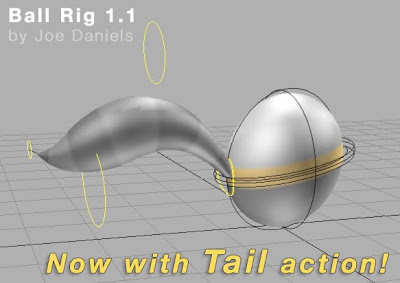
Animation Rigs: Ball 1.1 - includes Tail

Here's an update to the very basic ball rig for Maya that I put up earlier this past year. The controls, mainly the squash control, have been tweaked to be easier to select. The geometry now sits on its own layer which can be un-referenced to apply a different shader. But the big update is the addition of a splineIK-driven tail which can be scaled and placed wherever you like.

Download it HERE, or by clicking on the image above. Enjoy!


Edit Feb 27, 2010: I've added an alternate .ma download for those who work in versions of Maya previous to 8.5. You'll need to edit the file in a text editor and replace all the lines that designate the Maya version (2009 in my case) with your version, or just delete that line completely. I have no way of testing this, btw, but it should work just fine.

Wednesday, July 08, 2009

Animation Rigs: Juicebox

Click image above to Download

Here's another rig of mine, made in Maya for my Animation 1 classes at Ex'pression College. I wanted to give the students an alternative to the Luxo Lamp rig they have used in the past for the inanimate object assignments.

It has the ability to rock back and forth on it's base, squash and stretch in the mid section, and an IK/FK switch for the straw. It's a fun character to animate with...kinda the 3d equivalent to the traditional flour sack idea. Enjoy!

Sunday, April 05, 2009

Animation Rigs: Eyes & Brow

Click image above to Download

Another simple rig for Maya. This one is great for practicing eye and brow animation. There's a lot that you can do to change the spacing, size, and shape of the eyes and brows, so download it and check out the ReadMe for usage notes.

Here's a very quick test I did with the rig to see how it animates. You have to be careful to maintain volume in the brows as you pose them, but it's a fun rig, if I do say so myself. Enjoy!

Animation Rigs: Ball

Ball Rig 1.0
Click image above to Download

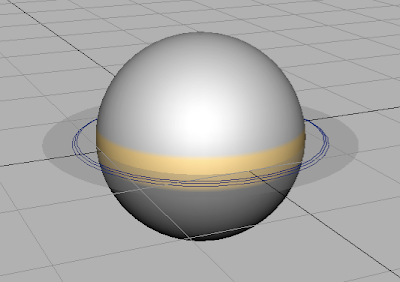
Here's possibly the most simple rig ever. For the bouncing ball assignment in the animation class I taught this term, the students worked with a rig that was...well...lacking. So after looking around a bit, I decided to just rig up my own. It has one control to move, rotate, and scale the ball, and another control to squash it.

This rig was made in Maya 2009, but will work in previous versions. Check out the Readme.rtf in the .zip file for usage notes, and let me know if anything breaks. Here are a couple screen caps of it in action!